

You captured an incredible 3D scene. Now try getting it to someone else.
3D scan files are massive, specialized, and impossible to just attach to an email. Most platforms give you all-or-nothing sharing with zero control over what viewers can actually access.
Files too big to share
Gaussian Splats are massive. You can't email them, most file-sharing tools choke on them, and clients shouldn't need specialized software to view your work.
No control over who sees what
You want to show the 3D walkthrough but keep raw scan data private. Or share deliverables with a client but not the underlying source files. Most platforms don't give you that choice.
Sharing one project at a time is tedious
When a client has 10 properties or a construction firm has 30 site scans, sharing each project individually wastes hours and creates a management nightmare.
Share Privately. Know Exactly Who Has Access.
Enter email addresses, click Done. Each recipient gets a notification and can view your project after registering a free account. No one else can access it—even if they somehow obtain the link.
- Invite unlimited recipients, comma separated
- Viewers register free—no paid subscription required
- Invitation emails sent instantly
- Revoke access at any time
One Link. Anyone Can Explore Your 3D Scene.
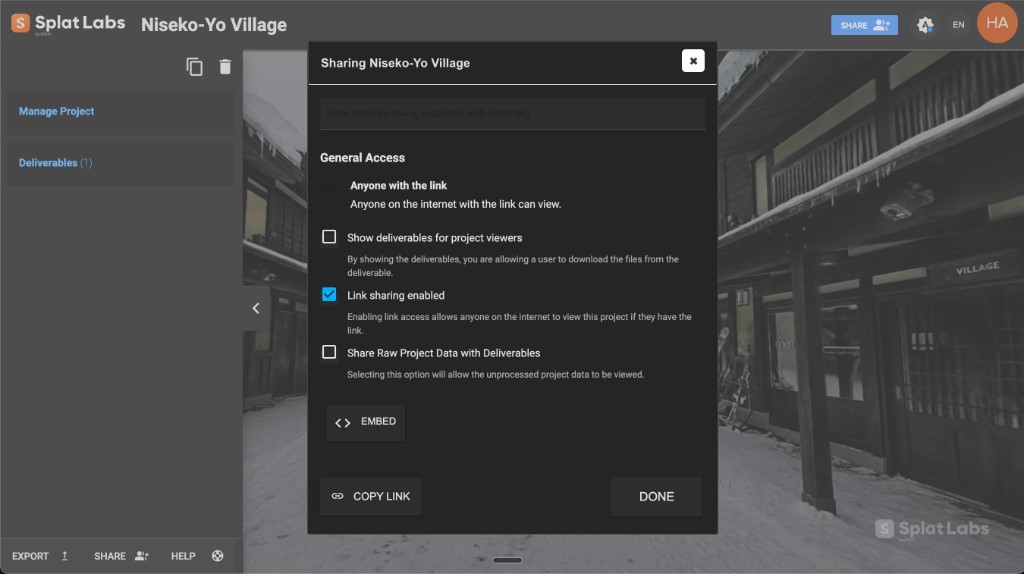
Enable link sharing and copy the URL. Anyone with the link can view your project in their browser—no account required. Need to embed it on a website? Link sharing unlocks the embed code too—a single iframe tag that works on any platform.
- No account required for link viewers
- Enable or disable link sharing any time
- Share on social media, MLS listings, or any platform
- Combine with email sharing—both can be active simultaneously
Control Exactly What Viewers Can Access
Every project has two layers of data—deliverables and raw project data. Two simple checkboxes let you decide which viewers can access.
Deliverables
Supplemental files you attach to a project—PDF reports, floor plan exports, photos, contracts, inspections. Check this to let viewers download them.
Raw Project Data
The core scan data—your Gaussian Splat model, source files, measurements, and exports. The underlying asset that everything else is built from.
Tailor the Experience for Every Audience
Show the 3D walkthrough plus polished reports and floor plans. Keep raw scan data private.
Give your team full access to everything—deliverables, raw data, and the 3D viewer.
Let viewers explore the 3D scene without access to any downloadable files.
Share an Entire Portfolio with One Action
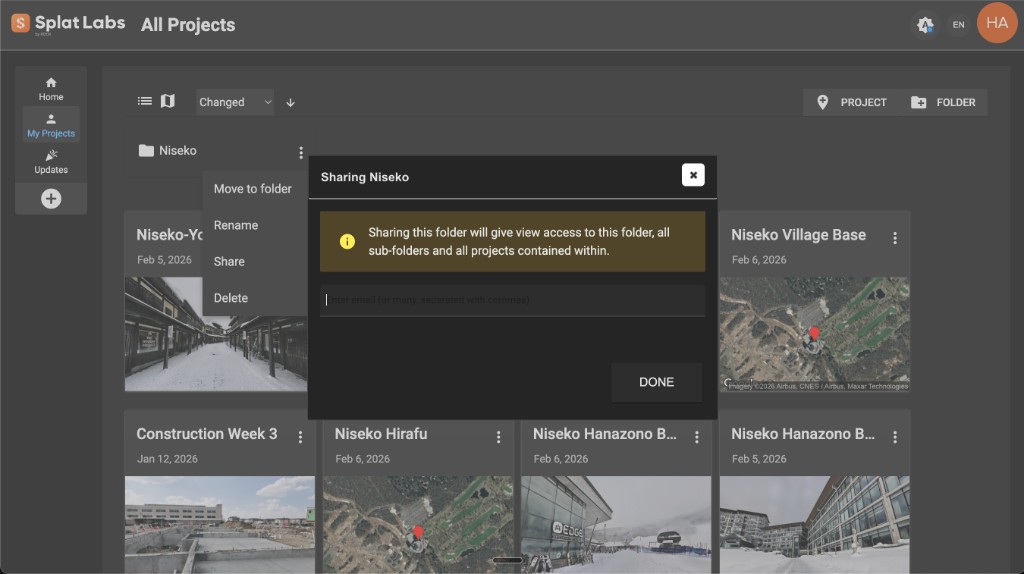
Stop sharing projects one at a time. Organize your work into folders by client, property, or job—then share the whole folder. The recipient gets instant access to every sub-folder and every project inside.
Navigate to My Projects and click FOLDER in the top right to create a new folder
Click the three-dot menu on the folder and select Share
Enter email addresses and click Done—all projects inside are now shared
Available on Business+. Folder sharing is email-only for security—no public link option for folders.
Embed Your 3D Scene on Any Website with One Line of Code
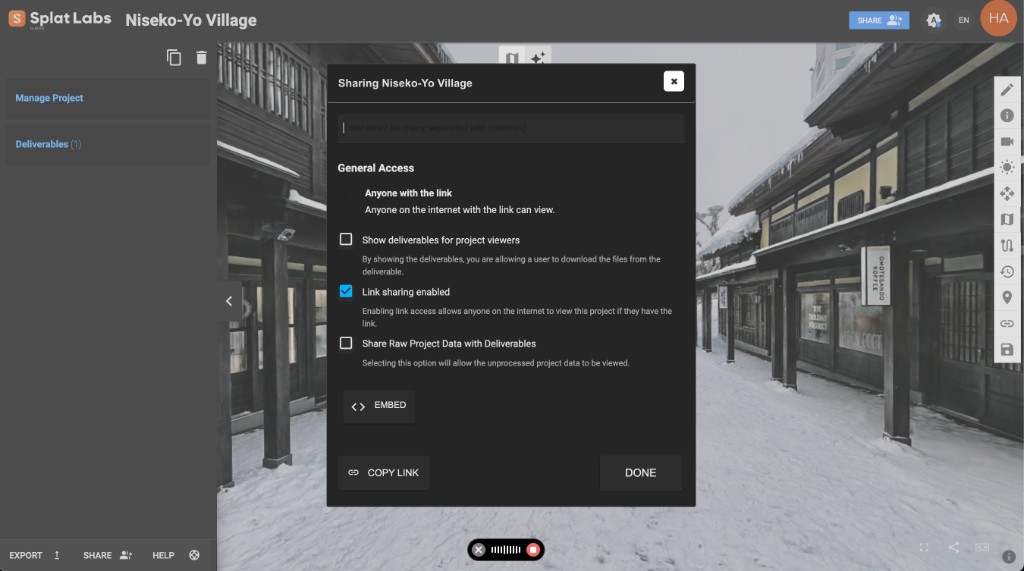
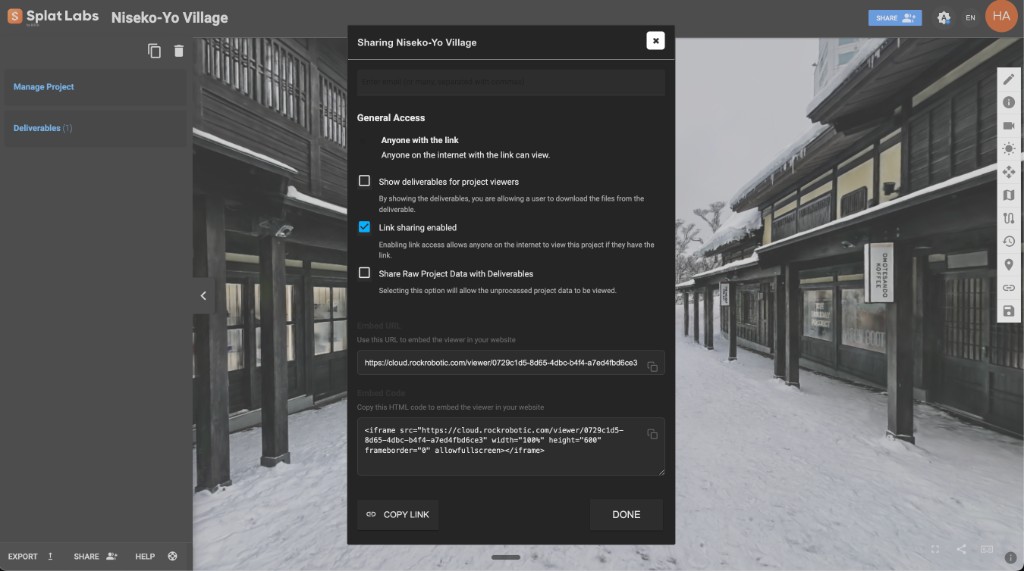
Click EMBED in the sharing dialog and copy the iframe code. Paste it into WordPress, Squarespace, Webflow, Wix, Zillow, MLS, Notion—any platform that accepts HTML. Your visitors explore the full 3D scene without leaving your page.
<iframe
  src="https://cloud.splatlabs.ai/viewer/{id}?view=splat"
  width="100%"
  height="600"
  frameborder="0"
  allowfullscreen>
</iframe>- Works on any website or CMS that accepts HTML
- Responsive — fills any container on any screen size
- No plugins, no app installs, no special viewer
- Works with public links or access-controlled projects (Business+/Enterprise)
All 5 members can view, embed, and share these projects
Your Whole Team. Every Project. Automatically Shared.
Enterprise groups eliminate manual sharing entirely. Every project created by anyone in the group is automatically visible to all other group members — like OneDrive for your 3D captures. Add a new team member and they instantly see every project from day one.
This means your iframe embeds, dashboard integrations, and viewer links are all access-controlled by group membership. Only authenticated group members can view them.
- Every project auto-shared across the group — zero manual sharing
- Iframes and embeds are access-controlled by group membership
- Three roles: Manager, Creator, and User
- Private projects when you need them
Granular Control. Plans That Scale with You.
Three distinct roles give you complete control over who can create projects, manage the organization, and view content.
- Enterprise Manager — full admin control, manages users, sees everything
- Creator — creates projects and folders, manages own content
- User — views and works on projects they have access to
- White label branding — present the viewer under your own brand
- Network licensing — processing licenses float across your team
Frequently Asked Questions
01Do viewers need a paid Splat Labs account to see shared projects?
No. When you share a project via email, recipients register a free Splat Labs account to view it. When you share via public link, no account is required at all—viewers simply open the link in any browser.
02Can I share a project with both email and link sharing at the same time?
Yes. Email sharing and link sharing are independent. You can invite specific people by email for tracked private access while also generating a public link for broader distribution. Both can be active simultaneously.
03What happens when I share a folder?
The recipient gets view access to the folder, all sub-folders within it, and every project contained inside—with a single share action. Any new projects you add to the folder later will also be accessible to existing recipients.
04Can viewers download my original scan files?
Only if you allow it. By default, viewers only see the 3D viewer. You control access to deliverables and raw project data independently using the two checkboxes in the sharing dialog. Leave both unchecked and viewers can explore the 3D scene but cannot download any files.
05Is folder sharing available with public links?
No. Folder sharing is email-only for security. You must enter the specific email addresses of the people you want to grant access to. This ensures you always know exactly who has access to your folder portfolio.
06Can I embed a shared project on my website?
Yes. In the sharing dialog, click the EMBED button to get a ready-to-use iframe code. Embeds work with both public and access-controlled projects. With link sharing enabled, anyone can view the embed. With email sharing (Business+) or Enterprise groups, only authorized users can view the embed—they will be prompted to sign in. The embedded viewer works on any website—WordPress, Squarespace, Webflow, Zillow, MLS, Notion, and more.
07What is the difference between deliverables and raw project data?
Deliverables are supplemental files you upload to the project—PDFs, floor plans, photos, reports. Raw project data is the core scan data itself—the Gaussian Splat model and associated files. You control viewer access to each category independently.
08Do Enterprise plans include team-level access control?
Yes. Enterprise plans start with 3 users and 50 projects, scaling up to 20+ users and 500+ projects. Enterprise groups automatically share all projects across team members—no per-project sharing needed. This also enables access-controlled iframes, so embedded viewers are protected by group membership. Three roles (Enterprise Manager, Creator, User) provide granular permissions over who can create, edit, delete, and share projects and folders. White label branding and network licensing are also included.